Have you ever missed an important call because you were in a meeting, traveling, attending classes, or dealing with poor network coverage? Call forwarding is one of the easiest ways to stay connected without carrying multiple phones or constantly worrying about missed calls.
In this guide, we will explain how call forwarding works, how to set it up on Android, the benefits of using a call forwarding app, potential charges, supported networks, and answers to common questions.
Table of Contents
- What Is Call Forwarding?
- Why People Use Call Forwarding
- Best Free Call Forwarding App
- Types of Call Forwarding
- How to Set Up Call Forwarding
- Benefits of Using Call Forwarding
- Supported Networks
- Call Forwarding Charges
- FAQ
- Final Verdict
What Is Call Forwarding?
Call forwarding is a telecom feature that automatically redirects incoming calls from your primary mobile number to another phone number.
Instead of letting calls go unanswered, your network forwards them to a secondary number based on the forwarding rules you choose.
This feature is widely used by professionals, business owners, students, travelers, and anyone who wants to remain reachable even when their main phone is unavailable.
Why People Use Call Forwarding
Call forwarding is useful in many situations:
- Your phone battery is low.
- You are traveling and carrying another SIM.
- You are attending meetings or classes.
- Your device is out of network coverage.
- You manage separate personal and work numbers.
- You want a backup number for important calls.
Best Free Call Forwarding App for Android
The Free Call Forwarding app is a lightweight Android application that helps users activate and manage call forwarding settings more easily than navigating through multiple phone menus.
Key Features
- Easy setup process
- Beginner-friendly interface
- Quick activation and deactivation
- Multiple forwarding modes
- Lightweight design
- Works on most Android devices
- Compatible with major Indian telecom networks
Types of Call Forwarding Explained
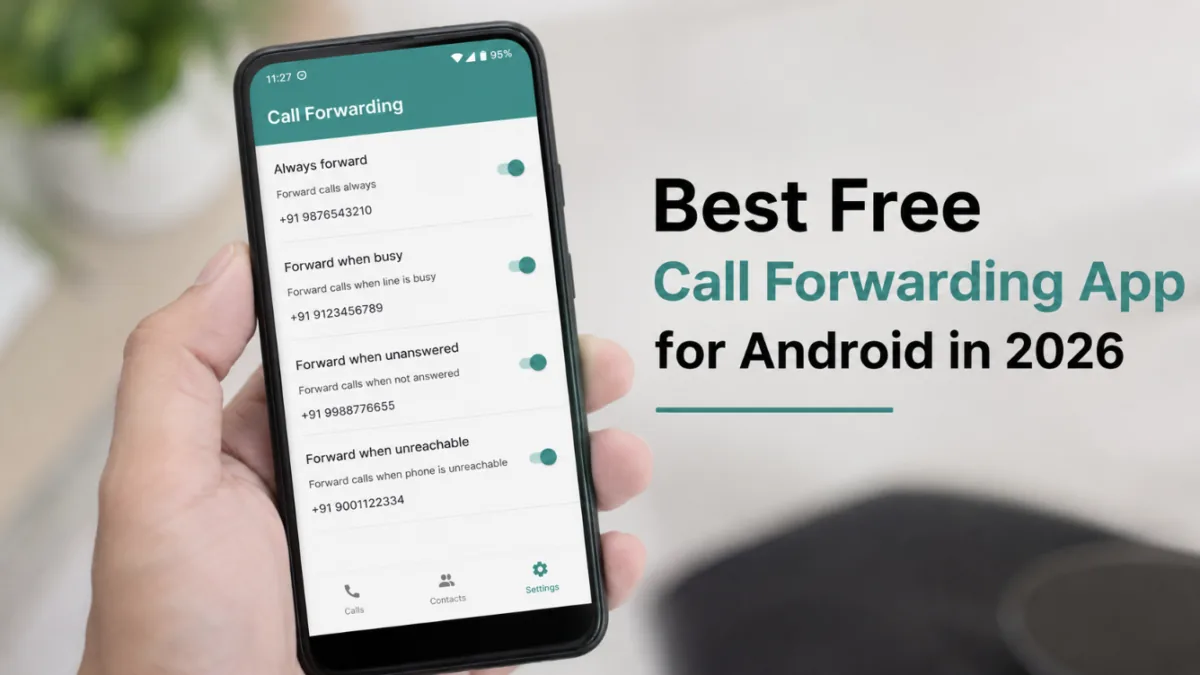
Always Forward Calls
Every incoming call is redirected to another number immediately.
Best for:
- Travel
- Secondary phone usage
- Dedicated business numbers
Forward When Busy
Calls are redirected only when you are already talking on another call.
Best for:
- Customer support
- Business users
- Heavy phone users
Forward When Unanswered
Calls are forwarded if you do not answer within a specific time period.
Best for:
- Professionals
- Students
- Office workers
Forward When Unreachable
Calls are redirected when your phone is switched off or outside network coverage.
Best for:
- Rural areas
- Frequent travelers
- Backup communication
How to Set Up Call Forwarding on Android
Follow these steps:
- Install the call forwarding app.
- Open the application.
- Select the forwarding type.
- Enter the destination phone number.
- Tap Activate.
- Confirm the forwarding request.
- Wait for network activation confirmation.
Once activated, incoming calls will be redirected automatically according to your selected settings.
How to Enable Call Forwarding Without an App
Most Android phones include built-in support:
- Open the Phone app.
- Tap the three-dot menu.
- Open Settings.
- Select Calling Accounts or Call Settings.
- Tap Call Forwarding.
- Choose a forwarding option.
- Enter the destination number.
- Save the settings.
Menu names may vary depending on the device manufacturer and Android version.
Benefits of Using a Call Forwarding App
Never Miss Important Calls
Stay reachable even when your primary phone is unavailable.
Better Business Communication
Ensure customers and clients can always contact you.
Improved Productivity
Reduce missed opportunities and communication delays.
Flexible Number Management
Manage multiple devices and phone numbers more efficiently.
Useful During Travel
Forward calls to a local or backup number when traveling.
Supported Indian Networks
Most call forwarding solutions work with:
- Jio
- Airtel
- Vi (Vodafone Idea)
- BSNL
Availability and charges depend on your telecom provider and plan.
Does Call Forwarding Cost Money?
The app itself may be free, but telecom operators can charge standard call forwarding rates.
Charges vary depending on:
- Mobile operator
- Active plan
- Local or long-distance forwarding
- Domestic or international forwarding
Always check your provider’s latest policies before enabling call forwarding.
Call Forwarding vs Android Settings
| Feature | Call Forwarding App | Android Settings |
|---|---|---|
| Easy Setup | Yes | Moderate |
| Beginner Friendly | Yes | Moderate |
| Faster Access | Yes | No |
| Multiple Options | Yes | Yes |
| Quick Disable | Yes | Yes |
Pros and Cons
Pros
- Easy to configure
- Saves time
- Reduces missed calls
- Useful for business users
- Works on most Android phones
Cons
- Carrier charges may apply
- Network support varies
- Some devices use different settings menus
Security and Privacy
Call forwarding itself is a legitimate telecom feature used worldwide.
However:
- Always verify the destination number.
- Disable forwarding when no longer needed.
- Avoid forwarding calls to unknown numbers.
- Review active forwarding settings regularly.
During testing, the app was simple to install and configure.
During testing, the app was simple to install and configure. The interface is straightforward and suitable for beginners who do not want to navigate complicated Android settings. The forwarding options are clearly labeled, making activation and deactivation quick and convenient.
The overall setup process takes only a few minutes depending on your mobile operator’s response time. Users should note that call forwarding functionality ultimately depends on carrier support.
Download the Best Free Call Forwarding App in 2026
Get the Free Call Forwarding App and easily redirect incoming calls to another number with just a few taps. Simple setup, multiple forwarding options, and support for most Android devices.

Frequently Asked Questions
Is call forwarding safe?
Yes. It is a standard telecom feature provided by mobile operators.
Can I disable call forwarding anytime?
Yes. You can disable it through the app or your phone settings.
Does call forwarding work when the phone is switched off?
Yes, if your operator supports forwarding when unreachable.
Will I know when call forwarding is active?
Most Android devices display a notification or forwarding indicator.
Does call forwarding work internationally?
Some telecom operators support international call forwarding, but additional charges may apply depending on your plan.
Can someone know that my calls are being forwarded?
In most cases, callers are not notified that a call has been forwarded.
Can I use call forwarding on dual SIM phones?
Yes. Most Android dual SIM devices allow call forwarding settings separately for each SIM card.
Do I need root access?
No. Root access is not required on most Android devices.
Final Verdict
Call forwarding remains one of the most useful communication features available on Android in 2026. Whether you are a student, professional, business owner, or frequent traveler, it can help ensure that important calls never go unanswered.
A reliable call forwarding app makes activation and management easier, while built-in Android settings provide an alternative option for users who prefer manual configuration. Before enabling forwarding, verify the destination number and review your operator’s latest charging policy to avoid unexpected costs.
Registration was super quick and I was able to start playing in minutes. Definitely a user friendly site. 10jiliccregister
Best slot site I have encountered in a while. The hit rate seems much better here than on other platforms. Give idslot97 a try!